Shipping is a core part of how you model fulfillment in commercetools. It is a crucial step in providing a good shopping experience, and with commercetools, it's possible to handle a diverse range of shipping options.
On this page, we describe the relationships between Zones, Shipping Methods, and shipping rates in commercetools, and how they can map to carrier shipping options. Understanding these relationships will help you design a shipping model before you configure it.
Zones
Here we can see a representation of a Zone which contains two countries:

- Each Project has a soft limit of
100Shipping Zones. - A country can only belong to one Zone at a time.
When you think about how to group countries into Zones, it is important to consider how your shipping carrier's options, including rates, relate to locations. For example, in larger countries, you may choose to create Zones for specific states or areas that have higher shipping costs.
Shipping Methods & Rates
Before you create a Shipping Method, you'll need to first configure at least one Zone within commercetools. While a Shipping Method can have multiple Zones, each individual Zone can be referenced only one time per Shipping Method.
100 Shipping Methods.Example
EU Trade West, which contains the countries Germany, France, and Denmark. We also have a second Zone called UK, which contains the United Kingdom.Standard Home Delivery and add individual shipping rates for each Zone:- Inside the
EU Trade WestZone, we can add a shipping rate for Germany and France in EUR and a shipping rate for Denmark in DKK. - Inside the
UKZone, we can add a shipping rate for GBP (United Kingdom).
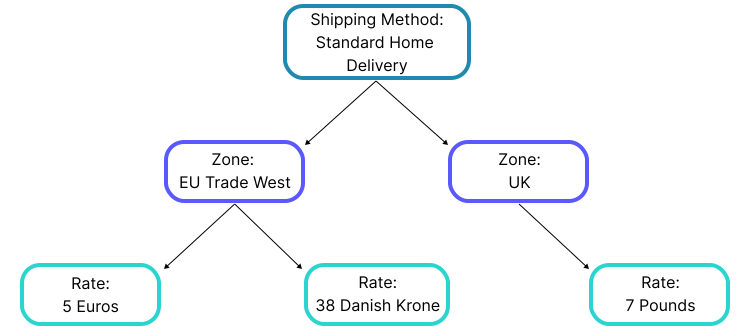
Shipping rates are defined individually and not tied to a specific exchange rate. This gives you the flexibility to charge different prices, depending on your business costs. In our example, we've decided to charge more for deliveries to the UK, because it takes a bit more paperwork and effort.
Shipping rate types
In commercetools, we categorize shipping rates as either fixed or tiered. This module focuses on fixed shipping rates and will not go into tiered shipping rates in detail. At this point, it’s enough for you to understand the basic difference between the two types of shipping rates.
- Fixed (default): The price of the Shipping Method always stays the same, regardless of Cart information.
- Tiered: The price of the Shipping Method is dynamic and its value changes based on the Cart Value, Cart Classification, or Cart Score.